for Helix Stadium and classic Helix Native
From song to preset, by actually listening.
Helix Tone Matcher measures the sound of a guitar, plays your own guitar through Helix and adjusts amp, drive and EQ until the result gets close to the song. If the song changes tone, you get one preset with one snapshot for each section.
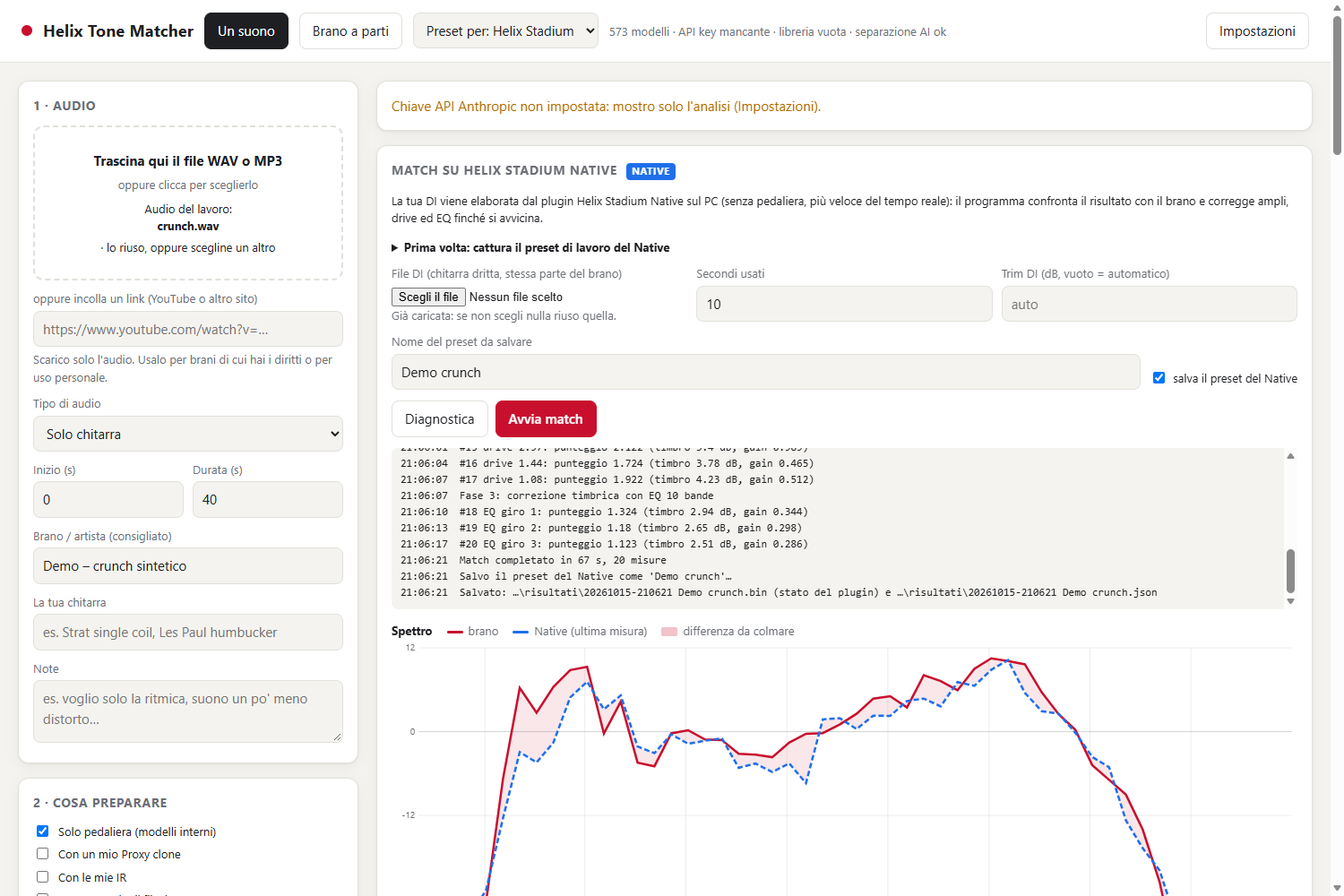
The song's spectrum (red) and the preset's (blue) get closer with every measurement. The interface is in Italian.
the point
It is not a preset generator.
A prompt that "writes" a preset is guessing: nobody ever listened to the result. Here the preset is tried, measured and corrected.
Prompt-based generator
- You describe a sound, a model proposes a preset.
- It never hears what comes out.
- The result may be close or far: you find out by playing.
- If it's wrong, you go back to turning knobs yourself.
Helix Tone Matcher
- Starts from the real song, not from a description.
- Plays your DI through the preset, records it and compares it with a measurement.
- Corrects and tries again: about 20 measurements for each sound.
- Every attempt has a score: you see whether it improves, chart in hand.
how it works
Four steps, one closed loop.
Measure
Spectrum, saturation, dynamics, delay, reverb and tempo of the song.
Play
Your clean guitar (DI) goes through Helix, even faster than real time.
Compare
The result is measured the same way as the song. A score tells you how close they are.
Correct
Amp, drive and EQ change, and it starts again, until improving no longer helps.
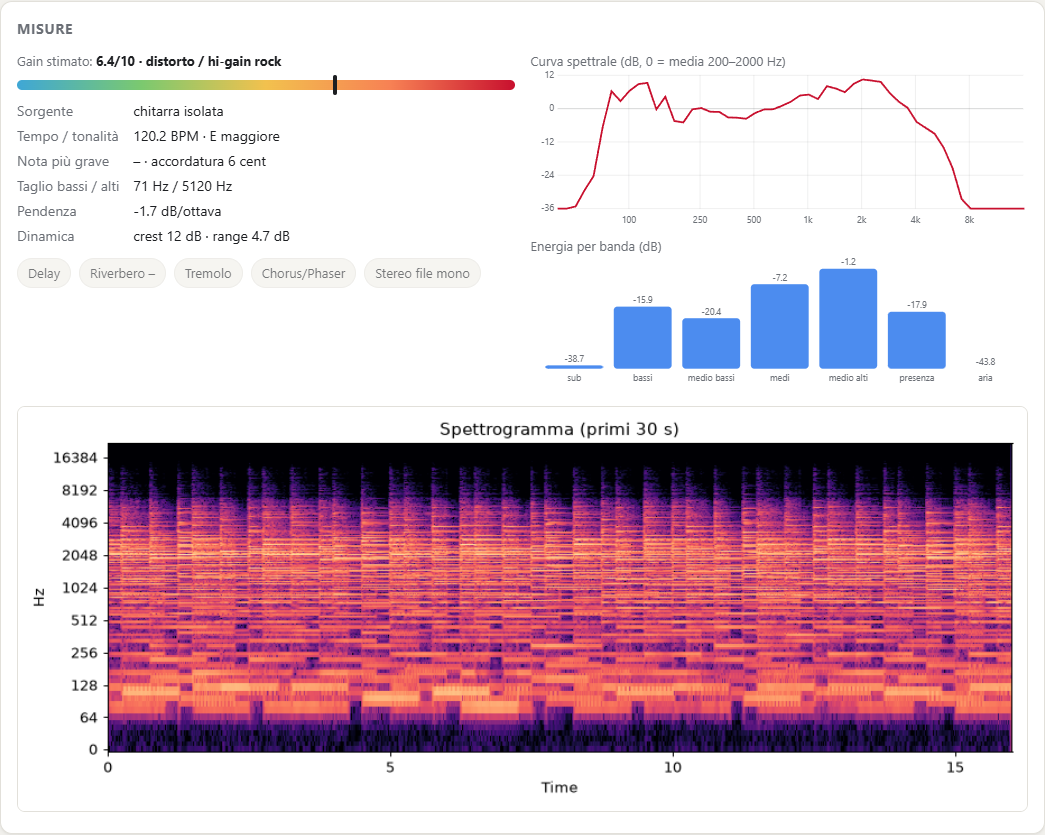
The song's measurements: estimated gain, spectrum, delay, reverb.
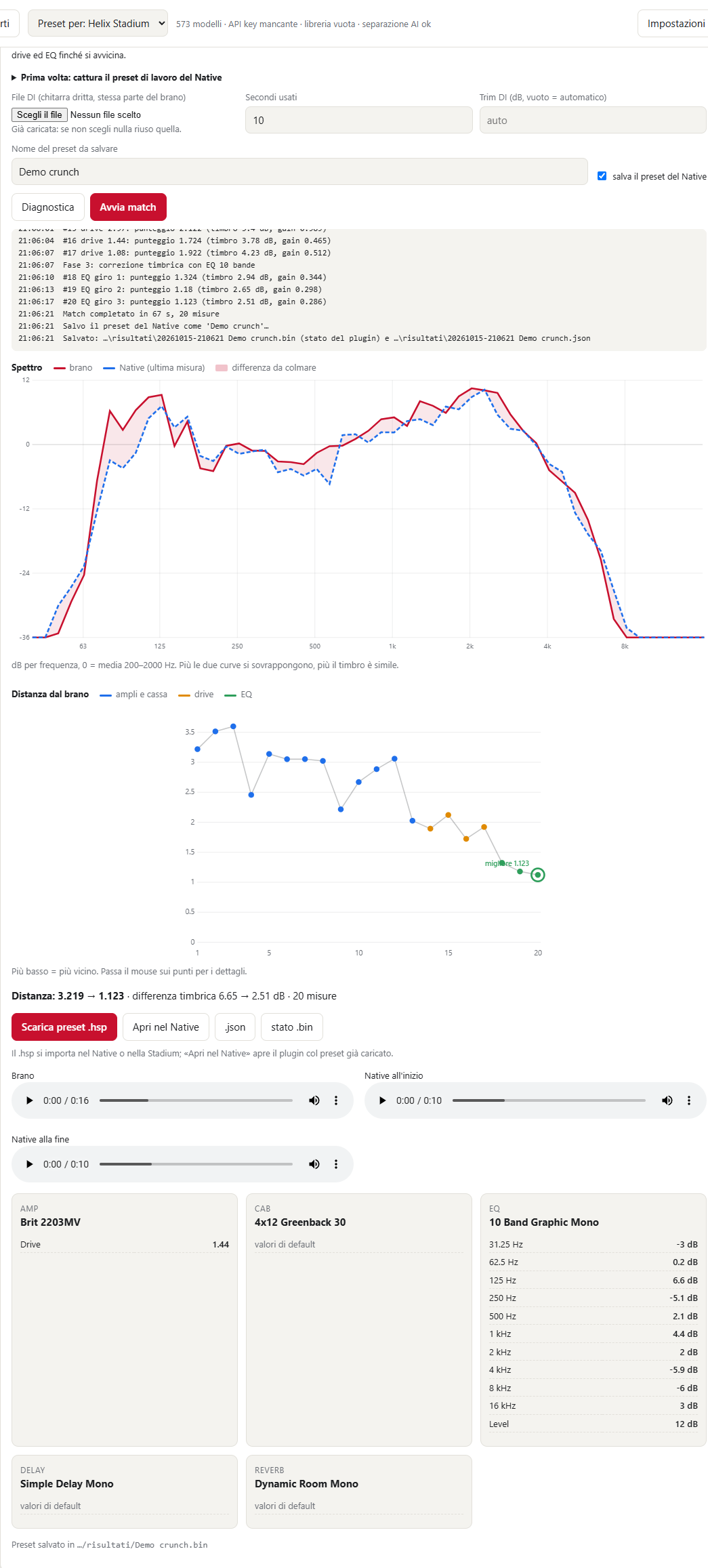
The match: spectrum and distance from the song, measurement after measurement.
song sections
One preset, one snapshot for every sound.
Give it a guitar track: the program finds where the tone changes, keeps up to 30 seconds of each sound and asks you to play them. Then it picks a single amp and cab for the whole song and adjusts drive, EQ, level, delay and reverb section by section. Each section becomes a snapshot, up to 8.
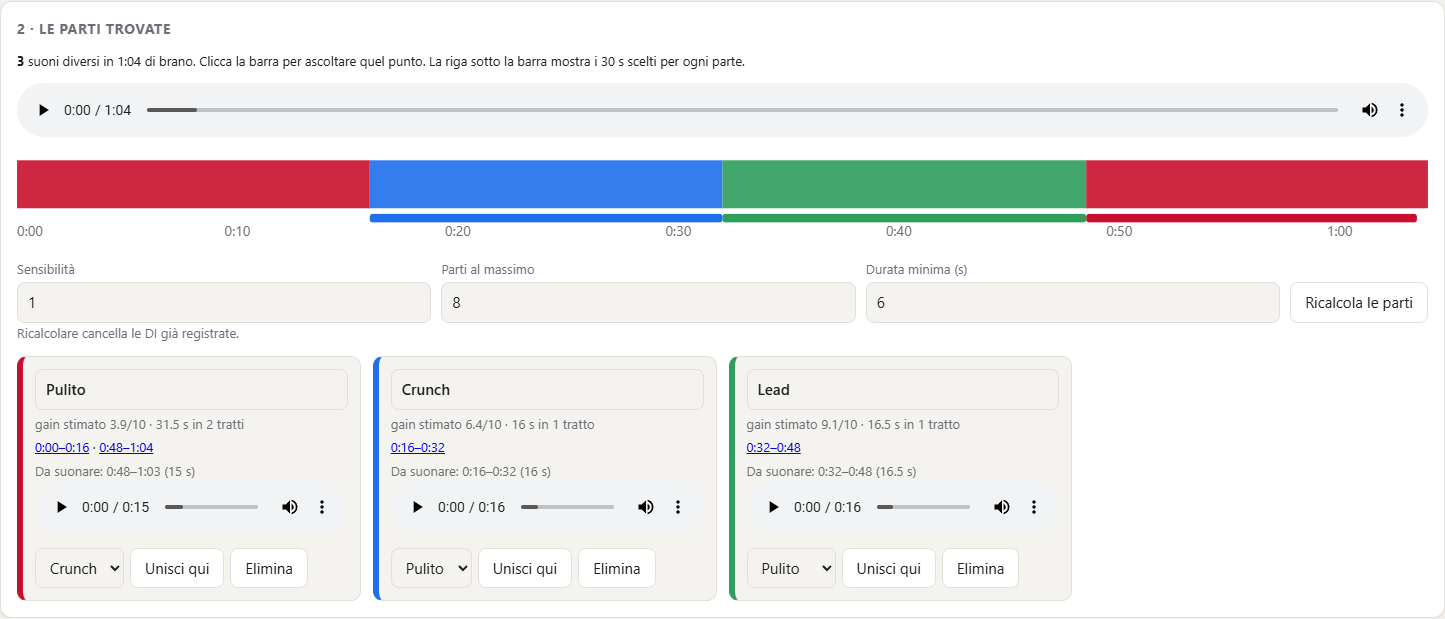
Three sounds found in one minute of guitar. Stretches that sound the same (here the clean tone, twice) end up in the same section.
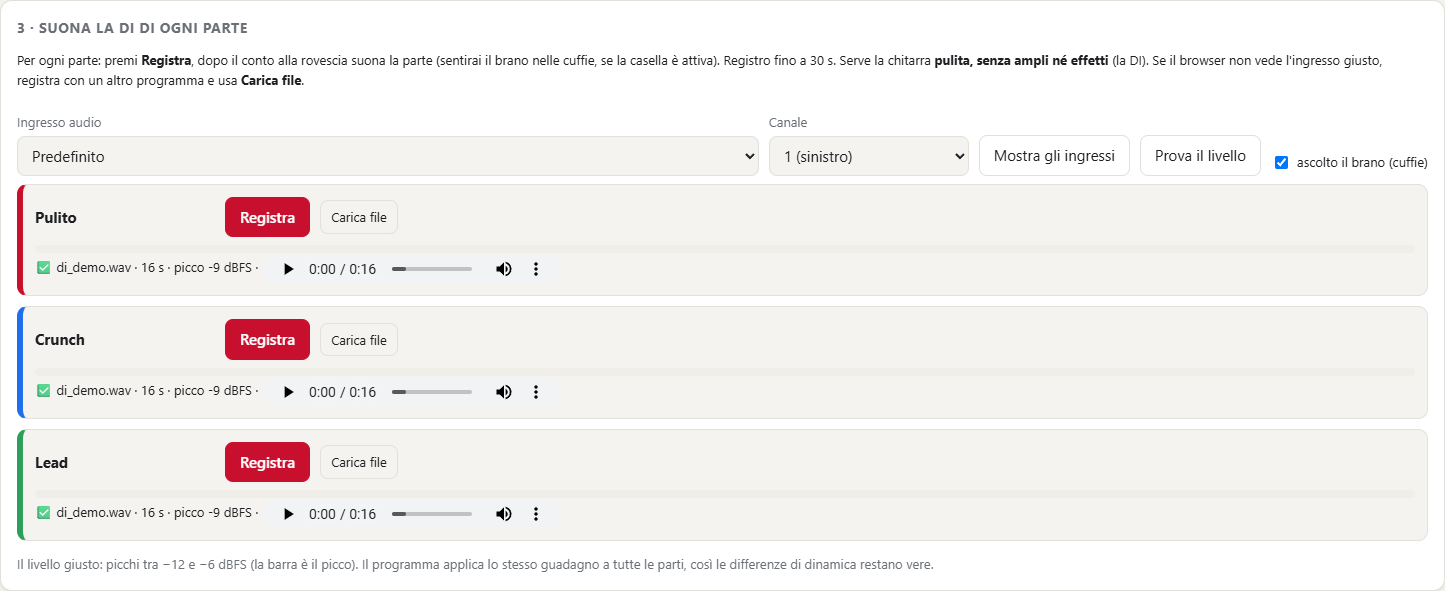
You record the DI of each section in the browser, or upload a file.
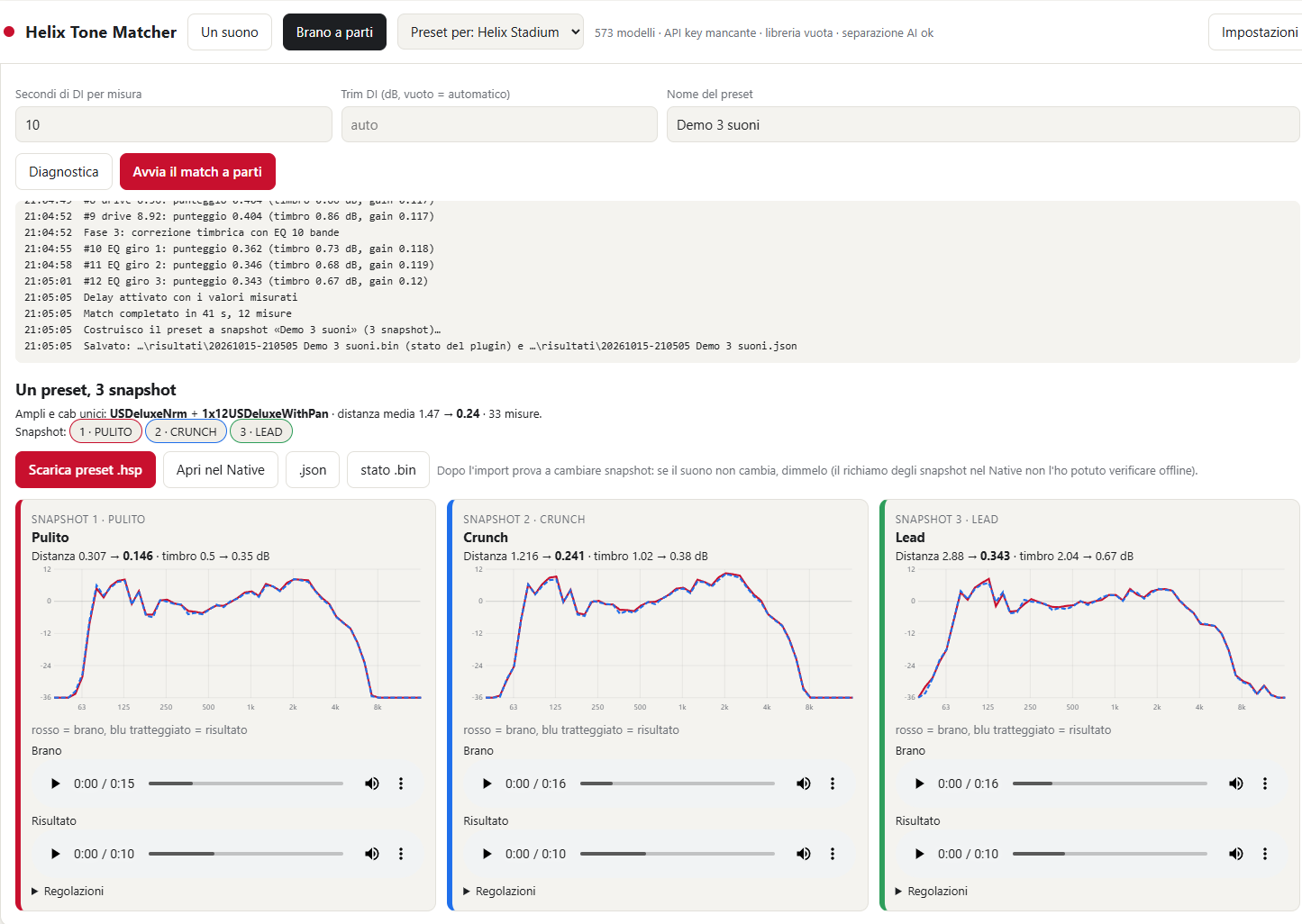
One preset, three snapshots: the song's spectrum and the result's for each section.
listen
Judge by ear, not by words.
A synthetic guitar with three sounds (clean, crunch, lead). The target sound was generated by Helix Stadium Native with a hidden preset: the program doesn't know it and has to find it.
Clean
Crunch
Lead
The numbers of this test
| Section | Distance at start | Distance at end |
|---|---|---|
| Clean | 0.31 | 0.15 |
| Crunch | 1.22 | 0.24 |
| Lead | 2.88 | 0.34 |
"Distance" is an internal measure: it combines the difference in spectrum and saturation between the preset and the target sound. The lower, the closer; 0 would mean identical. In this test the program also found the right amp (US Deluxe Nrm with its cab) among six candidates.
on real songs
And on a real song?
Two examples on guitars from well-known songs, shown for educational purposes only and not for profit, to show how the program behaves outside the lab. The reference is a 12-second excerpt, mono and deliberately degraded; the clean guitar (DI) and the results are ours, at full quality.
The Cranberries – “Zombie”
Hear the original on the official channel
Distance measured on these 12 seconds: 1.08; tonal difference 2.6 dB.
A good but not identical result: we show it as it is. The reference passage was chosen by looking for the same notes as the DI.
Marilyn Manson – “Sweet Dreams (Are Made of This)”
Hear the original on the official channel
Distance measured on these 12 seconds: 2.16; tonal difference 3.8 dB.
An average result: the reference comes from a full mix through automatic separation, so it is less clean than an original track.
presets to use
Three example presets.
These are the presets produced by the demo above. They show the result and let you try the import: they are not "gig-ready" presets.
Demo 3 sounds · with snapshots
Helix Stadium / Stadium Native.hsp
One preset, three snapshots (Clean, Crunch, Lead): a single amp and cab; drive, EQ, level and delay change.
Demo crunch
Helix Stadium / Stadium Native.hsp
A single sound, obtained by the program from a synthetic reference.
Demo lead · classic Helix
Helix Native (classic).hlx
A single sound, using only models that also exist on classic Helix.
Download all (zip, with instructions)
what you need
It runs on your PC.
The matching engine
Helix Stadium Native on the PC (the plugin does the work, faster than real time), or a Helix Stadium connected over USB.
Your guitar
A clean recording, with no amp or effects (DI). You can record it in the program or upload a file.
For full mixes
Separating the guitar from a whole song uses the NVIDIA graphics card (tested with 8 GB) and about 9 GB of free memory. A guitar-only track doesn't need it.
Your audio stays yours
Analysis happens on your PC. A Claude key is optional: if you use it, only numerical measurements of the sound (and, in one mode, a spectrogram image) are sent, never the audio.
For a classic Helix Native preset, the match still runs on Stadium Native and uses only models that also exist on the classic; the file you get is an .hlx (format checked against files from Helix Native; import on the hardware Helix units is untested).
plainly
What it does well, what it doesn't do yet.
It works
It finds amp, drive and EQ in known-answer tests. It finds the tone changes in a song and splits it into sections. It builds a preset with snapshots.
It has limits
Chorus, phaser and other modulations are still weakly detected. With very dense mixes, guitar separation can pollute the target. Without Claude the amp candidates are few: it's a starting point, not a guarantee.
Not there yet
Section matching directly on a connected Stadium (for now on Native), snapshot export for classic Helix, and lead/rhythm separation.
questions
Frequently asked questions.
Do I need a Helix Stadium?
You need the matching engine: Stadium Native on the PC, or the pedalboard connected. You can aim the preset at classic Helix Native too (.hlx file).
Is it artificial intelligence?
The core of the program doesn't write presets at random: it measures, tries and corrects. A model (Claude) can help choose the first amps to try, but it's optional and the decisions come from the measurements.
Which songs can I use?
Those you have the rights to, or for personal use. Of a song the program only uses numerical measurements of the sound; it doesn't redistribute it. The samples in the “Listen” section are synthetic; the real-song excerpts are short, degraded and for educational use.
How long does it take?
Each measurement on Native takes a few seconds: one sound takes about a minute and a half, a three-section song a few minutes. With the pedalboard connected each measurement takes longer.
Does the preset sound identical to the song?
No, and nobody can promise that: it gets close according to a measurement. It depends on the song, the guitar and how clean the DI is. The program lets you hear the reference and the result so you can judge.
how to get it
Work in progress.
Helix Tone Matcher is being tested. To try it, to ask for information, or to tell us how the example presets work for you, write to Matteo Temporini.